
USD
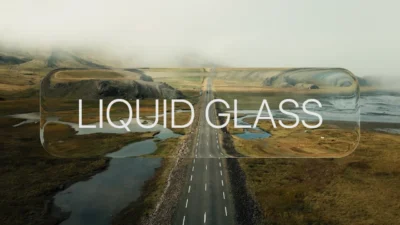
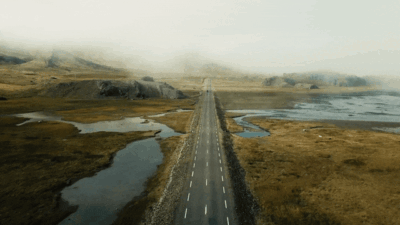
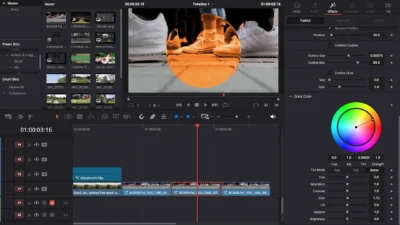
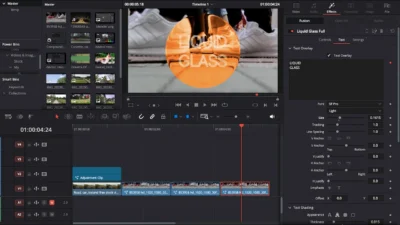


Liquid Glass Effect Template for DaVinci Resolve | Liquid Glass Full
USD
Create stunning Apple-style liquid glass visuals in seconds. A fully customizable drag-and-drop Fusion effect for DaVinci Resolve with built-in customizable animation, text overlay and its separate controls, and more.
$4.89
Create liquid glass effect with optional text overlay in seconds
Liquid Glass Full is a drag-and-drop template, used to create stunning, professional-grade liquid glass effects directly in DaVinci Resolve. Inspired by the polished and modern design aesthetics of Apple, this template gives you the power to add a touch of elegance and motion to any project.
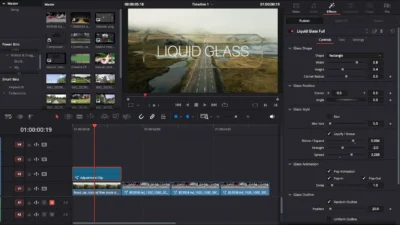
This is a fully-customizable powerful Fusion effect, consolidating all the complex controls into one simple Inspector panel. This template adds a stylish overlay to your footage, providing the ultimate flexibility to bring your creative vision to life with mesmerizing, fluid animations.
Key Features
This is not just a simple overlay, it is a fully customizable toolkit designed for maximum creative control. Every parameter is accessible directly from the Inspector panel for a fast, intuitive workflow.
- Advanced Glass Shape Control: Go beyond the basics. Choose between a Rectangle or Circle shape, then precisely dial in the Width, Height, and Corner Radius. Effortlessly adjust the Center (X/Y) and Angle to fit your composition perfectly.
- Signature Glass Styling:
- Adjustable Blur: Add depth and focus with a one-click Blur effect, complete with a Blur Size slider.
- Dynamic Liquify / Smear: Create the iconic liquid distortion effect. Master the look with control over Shrink/Expand, Strength, and Spread.
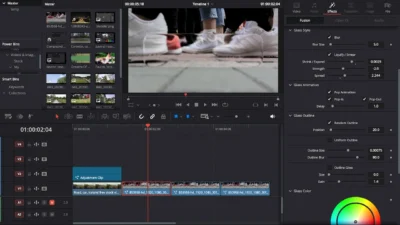
- Glass Animation: Pre-built animation with custom controls to fine tune, such as toggle on/off the whole Pop Animation or either toggle on/off any of the start (Pop-In) and end (Pop-Out) with Delay control to adjust the duration of the animation at start and end of the effect.
- Dynamic Glass Outline: Make your element stand out with two distinct outline modes. Choose between a creative, shifting Random Outline or a clean, crisp Uniform Outline, with position, size, blur, and glow controls.
- Glass Color: With this section, you have the option to even change the color of the glass shape to set the effect based on mood of the footage.
- Complete Text Customization: Your text, your way.
- Full Typographic Control: Adjust everything from Size, Tracking, and Line Spacing to vertical and horizontal anchoring and justification.
- Advanced Shading: Move beyond a simple solid color. The Text Shading engine supports Solid, Gradient, and even Image fills.
- Integrated Text Glow: Add a stunning, cinematic glow directly to your text. Simply toggle it on and fine-tune the Glow Size and Gain.
- Text Animation: The template comes with build-in animation, but with customizable control of animation Order and Delay to fine tune the text animation based on your need.
- Drag-and-Drop Simplicity: No need to dive into the Fusion page! Simply drag the effect onto any clip or an Adjustment Clip on your Edit Page timeline and start creating immediately.
What You’ll Get
You will get a ZIP file containing:
- LiquidGlassFull.drfx (installable template file)
- Font/ (includes SF-Pro.ttf (install this font before using the template))
- README.txt (instructions and usage guide)
Compatibility
- DaVinci Resolve (Free or Studio) – version 18 or later recommended.
- Works on Windows, Mac, and Linux.
How to Install
- Unzip the downloaded ZIP file.
- Open the Font folder and double-click the SF-Pro.ttf file to install the font.
- On Windows: Right-click and choose ‘Install’
- On macOS: Double-click and click ‘Install Font’
- Double-click LiquidGlassFull.drfx (the main template file).
- Click ‘Install’ (or ‘Overwrite’ if updating).
- Restart DaVinci Resolve.
- Go to the Edit Page.
- Find the template under: Effects Library → Toolbox → Effects → DvBlend
- Or use the search bar to find Liquid Glass Full.
How to Use
- Drag the Liquid Glass Full effect from the Effects Library and drop it onto your desired video clip or an Adjustment Clip on the timeline.
- Select the clip, and in the Inspector panel on the right, you will find all the controls to customize the effect to your liking!
Last Update
Date: 17 October, 2025
Related products
-
Free Circle Highlight and Zoom Template for DaVinci Resolve | Smart Circle Focus Free
$0.00 -
Text Reveal Inward & Outward Titles for DaVinci Resolve | 6 Animation Presets
$8.00 -
Dynamic RGB Split Effect Template for DaVinci Resolve
$6.99 -
Ultimate Arrow Animation Generator Pack for DaVinci Resolve
$9.99

Reviews
There are no reviews yet.