
USD



Free Heat Wave and Mirage Distortion Template for DaVinci Resolve | Heat Haze
USD
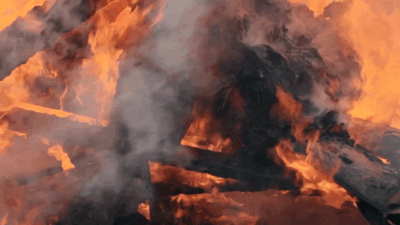
Add natural heat haze and mirage distortion to your footage in seconds. This drag and drop Heat Haze effect template creates realistic thermal waves, shimmering air, and cinematic heat distortion with fully adjustable controls.
$0.00
Create cinematic heat wave with this drag and drop template
This Heat Haze template is a fully procedural distortion effect for DaVinci Resolve that adds natural, shimmering atmospheric movement to your footage. This effect recreates real world thermal distortion, including road mirage, desert heat waves, summer haze, and rising turbulence from engines or hot surfaces. It gives your edits a cinematic, environmental feel while remaining simple and intuitive to use.
Designed for editors who want realistic thermal distortion without complicated node setups, Heat Haze lets you instantly apply the effect with drag and drop simplicity. With full control over intensity, shimmer speed, frequency, scale, and global fade, you can shape the exact heat effect your scene requires.
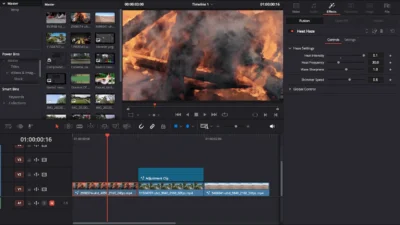
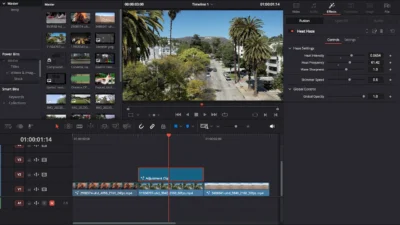
Simply drag and drop it onto a video clip, or place it on an Adjustment Clip to affect specific areas of your timeline. From the subtle shimmer of a hot summer day to the violent exhaust of a jet engine, you have total control over the temperature.
Features of this Template:
- Realistic Heat Simulation: Procedurally generated distortion that mimics real-world thermal waves.
- Full Customization:
- Heat Intensity: Control the intensity of the heat haze.
- Shimmer Speed: Adjust how fast the heat rises.
- Wave Scale & Sharpness: Fine-tune the look from soft summer air to intense exhaust fumes.
- Global Opacity Control: Easily keyframe the effect to fade in or out.
- Drag & Drop: No complex fusion compositing required; works directly in the Edit Page.
Compatibility
- Software: Works in DaVinci Resolve Free and Studio. Version 18.0 or later recommended.
- Operating Systems: Supports Windows and macOS.
- Plugins: No external plugins required. Fully Fusion native.
- Resolution: Compatible with HD, 4K, vertical, ultrawide, and all custom aspect ratios.
What is Included
Inside the ZIP package, you will find:
- HeatHaze.drfx – installable template file.
- README.txt – quick installation and usage guide.
How to Install
- Download and unzip the package.
- Double click HeatHaze.drfx to install the effect.
- Click Install (or Overwrite if updating).
- Restart DaVinci Resolve.
- In the Edit Page, open:
- Effects Library > Toolbox > Effects > DvBlend > Heat Haze
- (You can also search Heat Haze in the search bar)
How to Use
- In the Edit Page, drag and drop Heat Haze onto your video clip.
- For more flexibility, apply it to an Adjustment Clip placed above your footage.
- Select the clip and open: Inspector > Effects > Heat Haze
- Adjust the Heat Intensity, Frequency, Shimmer Speed, Sharpness, and Opacity to match your scene.
Related products
-
Free Customizable Cinematic Transition Template for DaVinci Resolve | Texture Wipe
$0.00 -
Free Circle Highlight and Zoom Template for DaVinci Resolve | Smart Circle Focus Free
$0.00 -
Free DaVinci Resolve Liquid Glass Effect | Liquid Glass Lite
$0.00 -
Floating Rectangle Outline and Highlight Effect for DaVinci Resolve | Open Rectangle Focus
$5.89




Reviews
There are no reviews yet.