
USD




Social Media Icon Generator for DaVinci Resolve | Supports 23 Platforms
USD
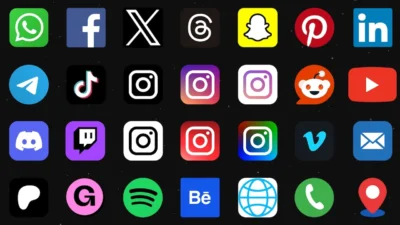
Create and customize social media icons in DaVinci Resolve with this powerful Social Icon Generator. Includes 23 platforms, built-in effects, color controls, and full resolution support.
Original price was: $16.00.$12.80Current price is: $12.80.
A Powerful All-in-One Social Icon Generator for DaVinci Resolve
Social Icon Generator is a dynamic Fusion-based generator for DaVinci Resolve that allows you to create, customize, and animate social media and contact icons directly inside your editing workflow.
With support for 23 popular platforms, advanced transform controls, built-in effects, and professional color adjustment tools, this template helps you display your online presence in a clean, modern, and consistent way.
No external assets. No complicated setup. No design skills required.
Just select a platform, customize it, and place it in your video.
Key Features
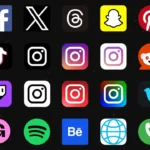
- 23 Built-In Platform Icons: Choose from a wide range of popular social media, messaging, streaming, and utility platforms using a simple dropdown selector. Includes Instagram, YouTube, TikTok, WhatsApp, Discord, Patreon, Gumroad, and more. See full list below.
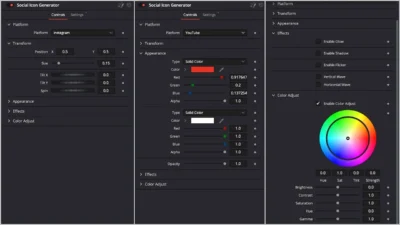
- Dynamic Platform Switching: Instantly change platforms from the inspector panel. The interface automatically adapts and shows only relevant controls for the selected icon.
- Advanced Transform Controls: Easily adjust and animate your icons with:
- Position
- Size
- Tilt X / Tilt Y (3D-style rotation)
- Spin
- Smart Appearance & Color Controls: Customize every icon to match your brand:
- Platform-based color controls
- Independent opacity slider
- Works with light, dark, and custom designs
- Change colors without breaking logo structure.
- Built-In Effects System: Add visual impact with integrated effects:
- Glow with adjustable gain and size
- Shadow with full control over strength, angle, distance, blur, and color
- Flicker with customizable strength and speed
- Vertical & Horizontal pre-animated waves with distortion and speed controls
- Each effect can be enabled, disabled, and fine-tuned individually.
- Professional Color Adjustment Tools: Fine-tune your final look with:
- Color wheel (Hue, Saturation, Tint)
- Brightness
- Contrast
- Saturation
- Gamma
- Perfect for matching your icons with your footage.
- Resolution Independent Design: Works perfectly on:
- Landscape (16:9)
- Vertical (9:16)
- Square (1:1)
- Custom resolutions
- No stretching. No breaking. No rebuilding.
Supported Platforms & Built-In Icons
Social Icon Generator includes 23 built-in platform and utility icons that can be selected instantly using the dropdown menu.
- Core Social & Video
- YouTube
- TikTok
- X (Twitter)
- Threads
- Snapchat
- Community & Messaging
- Telegram
- Discord
- Streaming, Audio & Video Hosting
- Spotify
- Twitch
- Vimeo
- Monetization & Portfolio
- Patreon
- Gumroad
- Behance
- Utility & Contact
- Website
- Phone Call
- Location
Compatibility
- Software: DaVinci Resolve 20 or newer (Free and Studio)
- Operating Systems: Windows, macOS, and Linux
What is included
You will receive a ZIP file containing:
- SocialIconGenerator.drfx (installable template file)
- README.txt
How to install
- Download and unzip the package.
- Double-click SocialIconGenerator.drfx to install the template.
- Click Install (or Overwrite if updating).
- Restart DaVinci Resolve.
On the Edit Page, navigate to: Effects Library > Toolbox > Generators > DvBlend > Social Icon Generator
You can also search for Social Icon using the search bar.
How to use
- On the Edit page, drag and drop the Social Icon Generator onto the timeline.
- Select the generator clip and open Inspector > Video > Generator.
- Choose a platform from the dropdown menu.
- Adjust position, size, and rotation.
- Customize colors and opacity as needed.
- Enable effects and fine-tune the parameters to your liking.
- Use the controls under Color Adjust to fine-tune the final look of the icon.
Why Choose Social Icon Generator?
- Saves time on every project
- Keeps your branding consistent across videos
- Eliminates the need for external design tools
- Works seamlessly in all resolutions
- Designed for real-world editing workflows
Frequently Asked Questions
- Does this work with vertical videos?
- Yes. It works perfectly with Shorts, Reels, and TikTok formats.
- Do I need Fusion knowledge?
- No. Everything is controlled from the Inspector panel.
- Can I change colors freely?
- Yes. You can fully customize colors and apply advanced adjustments.
Related products
-
Free Slide Text Animation Template for DaVinci Resolve | TextFlow 12 – Directional Slide Free
$0.00 -
Dynamic RGB Split Effect Template for DaVinci Resolve
$6.99 -
4500+ World and Country Outline and Shape Maps (1K & 4K) | World Map Collection
$14.99 -
Picture-in-Picture Effect Template for DaVinci Resolve | PiP Frame
$6.99

Reviews
There are no reviews yet.