
USD




Smooth Color Glow Wipe Transition Template for DaVinci Resolve | Radiant Linear Wipe
USD
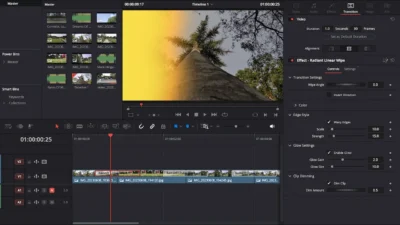
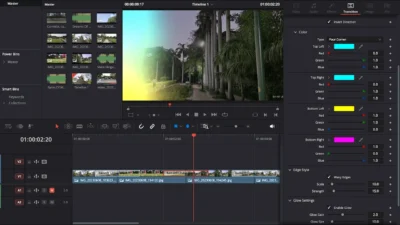
Radiant Linear Wipe is a smooth glowing transition for DaVinci Resolve that blends your clips using adjustable wipe angles, gradient color, and optional wavy organic distortion. Powered by a built-in radiant glow engine, it adds cinematic light leaks and bright, expressive motion to any edit. Fully customizable, beginner-friendly, and 100% Fusion-based.
$1.99
Glowing cinematic wipe transition for DaVinci Resolve
Radiant Linear Wipe is a smooth, glowing video transition for DaVinci Resolve that combines cinematic glow effects, gradient colors, wave styling at the edges, and dynamic wipe angles. This transition brings a radiant, modern feel to your edits by blending clips with a glowing light wipe that feels energetic, clean, and visually striking.
Designed for creators who want more than a basic wipe, Radiant Linear Wipe offers rich customization while staying fast, intuitive, and easy to use. You can adjust the wipe angle, enable smooth wavy edges, use solid or gradient colors, activate/deactivate the glow feature, and even dim the clip for dramatic contrast.
Features of this Template
- Adjustable Wipe Angle: Rotate the wipe line to any direction to match your edit’s flow and style.
- Invert Direction: Switch the wipe direction instantly with one checkbox.
- Wavy Organic Edges: Enable/Disable wavy edge for a modern, stylized look. Adjust wave Scale and Strength to achieve subtle ripples or bold distortions.
- Built-in Glow Engine: Enable/Disable to create cinematic glowing light leak style wipe with adjustable Glow Gain (brightness) and Glow Size (spread/softness).
- Clip Dimming for Contrast: Darken the footage behind the wipe using Dim Clip and Dip Amount, making the glowing transition stand out dramatically.
- Beginner-Friendly & Drag-and-Drop: Simply place it between clips and customize through the Inspector. No Fusion knowledge required.
- 100% Fusion-Based – No Plugins: Fully native to DaVinci Resolve, ensuring smooth performance on all systems.
Compatibility
- Software: Fully compatible with DaVinci Resolve (Free & Studio). Recommended for version 18.0 or later.
- Operating Systems: Works on Windows & macOS.
What is Included
Inside the ZIP package, you will find:
- RadiantLinearWipe.drfx – installable transition template
- README.txt – quick installation and usage guide
How to Install the Template?
- Download and unzip the package.
- Double-click RadiantLinearWipe.drfx to install the transition.
- Click Install (or Overwrite if updating).
- Restart DaVinci Resolve.
- In the Edit Page, open:
- Effects Library > Toolbox > Video Transitions > DvBlend > Radiant Linear Wipe
- (You can also search ‘Radiant Linear Wipe’ in the search bar.)
How to Use
- In the Edit Page, drag and drop Radiant Linear Wipe between two clips.
- Select the transition and open: Inspector > Transition > Radiant Linear Wipe
- Customize to your liking





Reviews
There are no reviews yet.