
USD






Liquid Noise Motion Background Generator for DaVinci Resolve
USD
Liquid Noise is a procedural motion background generator for DaVinci Resolve with Flow, Blobs, and Cells styles, offering smooth animated textures with full control over shape, motion, and color.
$5.99
Procedural liquid-style motion backgrounds with three built-in visual styles
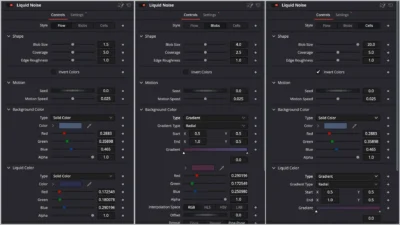
Liquid Noise is a customizable motion background generator for DaVinci Resolve that creates smooth flowing textures, organic blob shapes, and tech inspired cellular patterns. It includes three built in styles, Flow, Blobs, and Cells, giving you a wide range of abstract looks suitable for titles, interfaces, branding, and modern motion graphics.
Built entirely inside Fusion, the generator works without keyframes or external assets. All visual and motion parameters are controlled through a simple Inspector interface, making it easy to adapt the background to different moods, color palettes, and pacing, from slow ambient movement to more dynamic animated textures.
With flexible controls for blob size, coverage, edge roughness, motion speed, and colors, Liquid Noise works both as a full screen motion background and as a subtle animated layer behind text and graphics.
Features of this template
- Three Built In Styles: Switch between Flow, Blobs, and Cells to instantly change the visual character of the background.
- Shape Controls: Control Blob Size, Coverage, and Edge Roughness to adjust how large, filled, and smooth or noisy the liquid shapes appear.
- Motion Controls: Use Seed to generate new pattern variations and Motion Speed to control how fast the background moves.
- Color Controls: Set the Background Color and Liquid Color independently to match any design or brand palette.
- Invert Colors: Swap the liquid and background colors with one click for quick visual variations.
- Fully Procedural and Lightweight: Built entirely inside Fusion with no external footage or textures. Designed to be performance friendly and suitable for looping backgrounds and long timelines.
Compatibility
- Software: DaVinci Resolve 18 or newer (Free and Studio)
- Operating Systems: Windows, macOS and Linux
What is included
You will receive a ZIP file containing:
- LiquidNoise.drfx (an installable motion background generator)
- README.txt (installation and usage guide)
How to install
- Download and unzip the package
- Double click LiquidNoise.drfx to install the template
- Click Install (or Overwrite if updating)
- Restart DaVinci Resolve
On the Edit Page, navigate to: Effects Library > Toolbox > Generators > DvBlend > Liquid Noise
You can also search for Liquid Noise using the search bar.
How to use
- On the Edit Page, drag and drop Liquid Noise onto your timeline
- Select the clip and open Inspector > Video > Generator
- Choose a style: Flow, Blobs, or Cells
- Adjust Blob Size, Coverage, and Edge Roughness
- Change the Seed and Motion Speed
- Set Background and Liquid colors
- Use Invert Colors if needed
Use it as a full screen motion background or as an animated layer behind titles and text.
Related products
-
Animated Grid Background Generator for DaVinci Resolve | Dynamic Grid
$3.99 -
Corner Highlight and Zoom Effect for DaVinci Resolve | Smart Corner Focus
$6.99 -

Free Shadow Wipe Transition Template for DaVinci Resolve | Shadow Wipe Free
$0.00 -
YouTube Like and Subscribe Animation Titles for DaVinci Resolve | YouTube CTA Pack
$9.00


Reviews
There are no reviews yet.