
USD
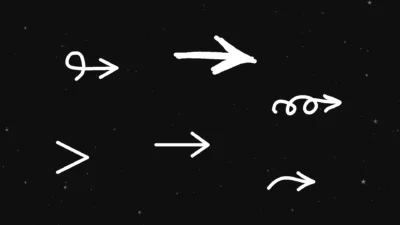



Free Arrow Generators for DaVinci Resolve
USD
A free collection of Fusion-based arrow generators for DaVinci Resolve, featuring draw-on and blink animation controls with adjustable center position, size, thickness, spacing, color, and other essential parameters through a simple Inspector interface.
$0.00
Free Arrow Generators with Draw-On and Blink Animation Controls
This Arrow Presets Pack provides a focused collection of clean, static arrow generators for DaVinci Resolve, built entirely inside Fusion. Each preset is designed for precise control, fast workflow, and flexible animation using simple Inspector parameters.
All arrows are lightweight generators with consistent controls, allowing you to animate visibility, draw-on effects, and timing without complex node setups. Each arrow can be animated using the Write On control for draw and reveal animations, or the Arrow Opacity parameter for blink and visibility control.
You can drag any arrow into the timeline, rotate it, resize it, adjust thickness, soften edges, change spacing, recolor it, and animate it directly from the Inspector.
Features
- Built natively inside Fusion
- Consistent Inspector controls across all presets
- Adjustable center position, size, thickness, and rotation
- Stroke softness and spacing control
- Color control with opacity blending
- Write On parameter for draw and reveal animations
- Arrow Opacity control for simple visibility and blink animation
- No external plugins required
- Drag-and-drop workflow
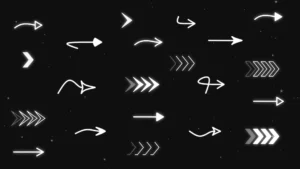
Looking for advanced arrow animation systems, blinking sequences, and editable shapes? Check out the Ultimate Arrow Animation Generator Pack.
Compatibility
- DaVinci Resolve 18 or newer
- Works in both Free and Studio versions
- Supported on Windows, macOS, and Linux
- Fusion-based generators for the Edit Page
What is included
You will receive a ZIP file containing:
- ArrowGenerators.drfx (Installable template file containing all 6 arrow generators)
- A README.txt (Installation and usage instructions)
How to install
- Unzip the downloaded ZIP file.
- Double-click ArrowGenerators.drfx file.
- Click Install or Overwrite if updating.
- This single file installs all 6 arrow generator presets at once.
- Restart DaVinci Resolve.
You will find the presets on the Edit Page under: Effects > Toolbox > Generators > DvBlend
Tip: Use the search bar and type Arrow for quick access.
How to use
- Drag any arrow preset onto your timeline.
- Select the clip and open Inspector > Video > Generators.
- Adjust center position, size, thickness, rotation, and other controls as needed.
- Animate the arrow using:
- Write On for draw and reveal animation
- Arrow Opacity for simple blink or visibility animation

Reviews
There are no reviews yet.