
USD


Directional Slide Transitions for DaVinci Resolve (Push + Overlay, Any Angle)
USD
Fully procedural directional slide transitions for DaVinci Resolve. Includes left, right, top, bottom, and any-angle slides with push and overlay mode, easing controls, motion blur, and duration-independent behavior.
$7.99
Directional Slide Transitions for DaVinci Resolve (Any Angle Included)
Directional Slide Transitions for DaVinci Resolve is a fully procedural transition pack designed to create clean, controlled slide movements between clips. The pack includes five Fusion based video transitions where the outgoing clip moves out of the frame while the incoming clip moves in from the opposite direction. Each preset also includes an Overlay Mode option that allows the incoming clip to slide onto the screen without pushing or moving the outgoing clip.
These transitions are built for editors who need precise directional control without keyframing or external plugins. All behavior is handled procedurally inside Fusion, allowing you to adjust transition duration, easing, overlay behavior, motion blur, and direction directly from the Inspector.
What This Product Is
This pack includes five fully procedural directional slide video transitions built entirely inside Fusion:
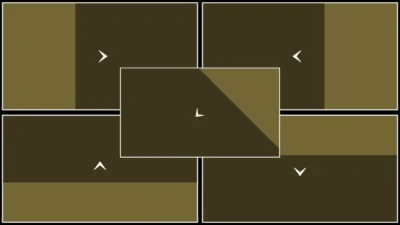
- Directional Slide Left: Moves the first clip to the left while bringing the next clip from the right into the center. When Overlay Mode is enabled, the first clip remains unchanged.
- Directional Slide Right: Moves the first clip to the right while bringing the next clip from the left into the center. When Overlay Mode is enabled, the first clip remains unchanged.
- Directional Slide Top: Moves the first clip upward while bringing the next clip from the bottom into the center. When Overlay Mode is enabled, the first clip remains unchanged.
- Directional Slide Bottom: Moves the first clip downward while bringing the next clip from the top into the center. When Overlay Mode is enabled, the first clip remains unchanged.
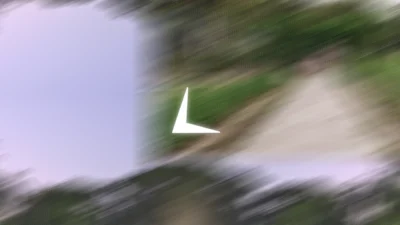
- Directional Slide Any Angle: Moves the first clip outward along a user defined angle while bringing the next clip from the opposite direction into the center. When Overlay Mode is enabled, the first clip remains unchanged.
All transitions are duration independent, resolution aware, and designed to work consistently across different aspect ratios.
Features of This Template
- Directional Slide System: Each transition follows a consistent directional logic where the outgoing clip exits the frame and the incoming clip enters from the opposite direction. When Overlay Mode is enabled, the outgoing clip remains unchanged while the incoming clip slides in. The Any Angle preset adds angle based control for diagonal and custom slide directions.
- Duration Independent: Transition length can be increased or reduced directly on the timeline. The animation automatically adapts without breaking timing or edge alignment.
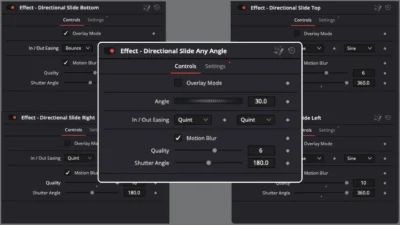
- Easing Controls: In and Out easing can be selected from a dropdown menu, allowing precise control over acceleration and deceleration during the transition.
- Overlay Mode: Optional Overlay Mode allows the incoming clip to slide onto the screen without pushing or moving the outgoing clip. This makes it possible to switch between push style and overlay style behavior using a single control.
- Motion Blur: Built in motion blur can be enabled or disabled from the Inspector. Blur quality and shutter angle can be adjusted to smooth fast movements and improve visual continuity.
- Fully Procedural: All transitions are built entirely inside Fusion. No keyframes are required, and no external assets or third party plugins are used.
- Performance Friendly: Designed to be lightweight and reliable for real world editing workflows, including long timelines and high resolution footage.
Compatibility
- Software: DaVinci Resolve (Free and Studio versions)
- Operating Systems: Windows, macOS, and Linux
- Plugins: No third party plugins required
What Is Included
You will receive a .zip file containing:
- DirectionalSlideTransitions.drfx: An installable file that includes all five directional slide transitions.
- README.txt: Installation and usage instructions.
How to Install
- Unzip the downloaded ZIP file.
- Double click DirectionalSlideTransitions.drfx.
- Click Install or Overwrite if updating.
- Restart DaVinci Resolve.
- You will find the transitions on the Edit Page under: Effects > Toolbox > Video Transitions > DvBlend
- Tip: Use the search bar and type Directional Slide to locate them quickly.
How to Use
- Place two clips on the timeline so they overlap.
- Drag a Directional Slide transition onto the edit point between the clips.
- Select the transition and open the Inspector > Transition.
- Adjust the available controls including easing, overlay mode, motion blur, and angle where applicable.
- Change the transition duration directly on the timeline as needed.
All transitions adapt automatically to the chosen duration and resolution.
Related products
-

Free Shadow Wipe Transition Template for DaVinci Resolve | Shadow Wipe Free
$0.00 -
Corner Highlight and Zoom Effect for DaVinci Resolve | Smart Corner Focus
$6.99 -

Text Reveal Inward & Outward Titles for DaVinci Resolve | 6 Animation Presets
$8.00 -

Free Heat Wave and Mirage Distortion Template for DaVinci Resolve | Heat Haze
$0.00




Reviews
There are no reviews yet.