$ USD


DaVinci Resolve Progress Bar & Loading Bar Animation Templates Pack
Create professional DaVinci Resolve progress bar and loading bar animations with 4 customizable Fusion generators. Choose circular, rectangular, edge, or free progress bars, and customize progress, thickness, colors, animation easing, glow, shadow, and more.
$7.99
- Instant download
- One-click
.drfxinstallation - Free & Studio compatible
- Customizable Inspector controls
Create customizable progress bars and loading bar animations directly in DaVinci Resolve
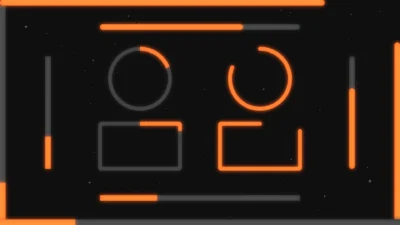
DaVinci Resolve Progress Bar & Loading Bar Animation Templates Pack is a collection of 4 professionally designed Fusion generators for creating circular, rectangular, edge-aligned, and freely positioned progress bar animations. Each generator includes customizable progress controls, timing options, styling controls, entrance and exit animations, glow, shadow, and color settings.
Create clean DaVinci Resolve progress bar animations, loading bars, circular progress indicators, rectangular progress bars, edge progress bars, and free-positioned progress lines without building the animation from scratch. Choose the progress style that fits your project and customize its appearance and behavior directly from the Inspector.
Control the progress direction, maximum fill, thickness, timing, position, length, colors, animation, glow, and shadow. The Mark Start & End controls also let you define exactly when the progress animation begins and ends within the clip.
These progress bar and loading bar templates are suitable for YouTube videos, social media content, tutorials, presentations, advertisements, promotional videos, UI animations, loading screens, infographics, data visualization, countdown graphics, motion graphics, and other video projects that need clear and customizable progress animations.
Included Templates
4 DaVinci Resolve Fusion Progress Bar Generators
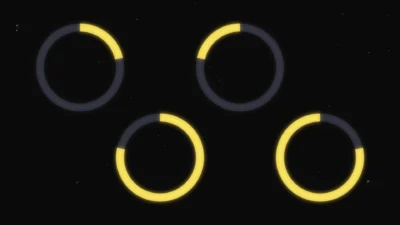
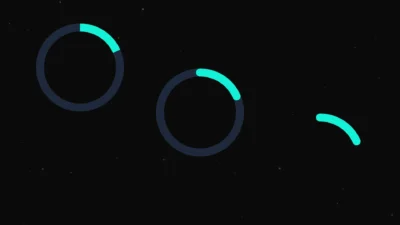
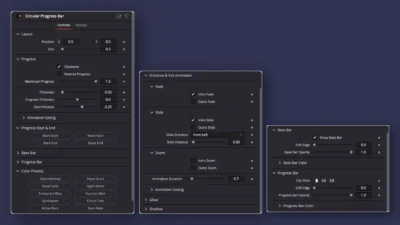
- Circular Progress Bar – Create circular and radial progress animations with customizable direction, fill amount, thickness, start position, and styling.
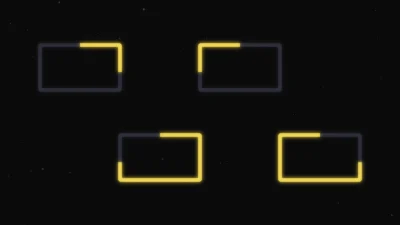
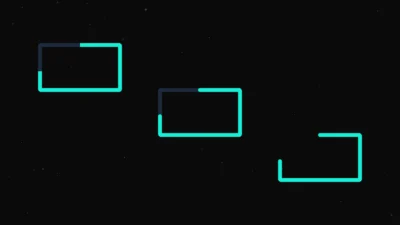
- Rectangular Progress Bar – Create customizable rectangular progress bars with adjustable width, height, corner radius, angle, thickness, and progress settings.
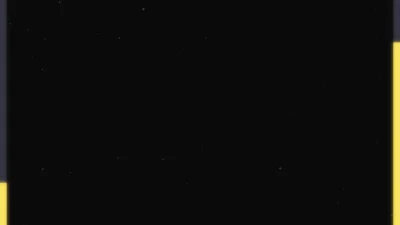
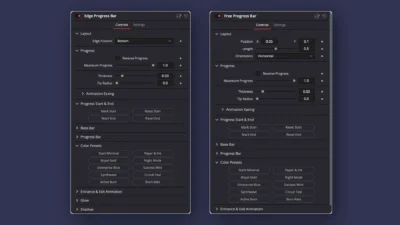
- Edge Progress Bar – Create progress and loading bars attached to the Bottom, Top, Left, or Right edge of the frame.
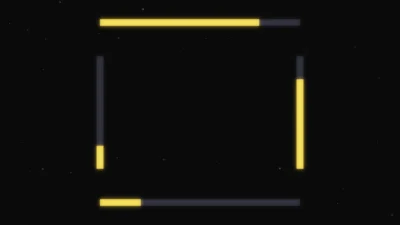
- Free Progress Bar – Create freely positioned horizontal or vertical progress lines with adjustable position, length, orientation, and styling.
Features
- 4 customizable Fusion progress bar generators
- Circular, rectangular, edge, and free-positioned progress bar styles
- Customizable progress direction
- Maximum Progress control for limiting the final fill amount
- Custom Progress Start & End controls
- Adjustable progress thickness
- Independent progress thickness control for circular and rectangular bars
- Fade, Slide, and Zoom entrance and exit animations
- Animation Easing controls
- Customizable base bar and progress bar appearance
- 10 built-in color presets
- Adjustable glow and shadow effects
- No third-party plugins required
Compatibility
- Software: DaVinci Resolve 20 and newer (Free and Studio versions supported)
- Template Type: Fusion Generators
- Operating Systems: Windows and macOS
What You Will Receive
You will receive a ZIP file containing:
- Progress_Bar_Pack.drfx – Installable DaVinci Resolve template pack containing all 4 progress bar and loading bar generators.
- README.txt – Installation instructions and quick start guide.
How to Install
- Download the ZIP package.
- Extract the ZIP file.
- Double-click the .drfx file.
- Click Install (or Overwrite if updating an existing version).
- Open the Edit page in DaVinci Resolve and open the Effects Library.
- Navigate to Toolbox → Generators → DvBlend to find the templates.
- You can also use the Effects Library search bar to quickly find the templates by searching for Progress Bar or the individual template names.
- If the templates do not appear immediately in the Effects Library, restart DaVinci Resolve.
For detailed step-by-step instructions: How to Install DaVinci Resolve Templates (.drfx Files)
How to Use
- Open the Edit page in DaVinci Resolve.
- Open the Effects Library and navigate to Toolbox → Generators → DvBlend.
- Drag the desired progress bar generator onto the timeline.
- Select the generator clip and open the Inspector.
- Choose the progress settings and adjust the appearance to match your project.
- Use the Mark Start & End button controls to define when the progress animation starts and ends.
- Customize the progress bar colors, thickness, animation, glow, shadow, and other available controls.
Customization
Each generator includes professionally organized Inspector controls for adjusting the progress animation, layout, appearance, and effects directly inside DaVinci Resolve.
Progress
- Progress direction
- Reverse Progress
- Maximum Progress
- Progress thickness
- Progress Start & End markers
- Animation Easing
Circular and Rectangular Progress Bar
- Clockwise or anti-clockwise progress direction
- Start Position
- Base bar thickness
- Additional progress thickness
- Position and size controls
- Customizable base and progress bars
Edge Progress Bar
- Edge position: Bottom, Top, Left, or Right
- Adjustable thickness
- Tip radius
- Customizable base and progress bars
Free Progress Bar
- Horizontal or vertical orientation
- Position X and Y
- Adjustable length
- Adjustable thickness
- Tip radius
- Customizable base and progress bars
Base Bar & Progress Bar
- Enable or disable the base bar
- Base bar opacity
- Base bar color
- Progress bar opacity
- Progress bar color
- Soft Edge
- Cap Style where available
Color Presets
- Stark Minimal
- Paper & Ink
- Royal Gold
- Night Mode
- Enterprise Blue
- Success Mint
- Synthwave
- Circuit Teal
- Active Burn
- Burn Rate
Entrance & Exit Animation
- Intro Fade
- Outro Fade
- Intro Slide
- Outro Slide
- Intro Zoom
- Outro Zoom
Glow
- Enable or disable glow
- Glow strength
- Glow size
Shadow
- Enable or disable shadow
- Shadow offset
- Shadow softness
- Shadow color
Why You Will Love It
Instead of building progress and loading animations manually in Fusion, this pack gives you 4 ready-to-use DaVinci Resolve progress bar templates covering circular, rectangular, edge, and freely positioned designs.
Choose the generator that fits your project, set the maximum fill, adjust the progress timing, customize the colors and thickness, and add optional fade, slide, zoom, glow, or shadow effects directly from the Inspector.
The combination of circular progress bars, rectangular progress bars, edge loading bars, and free-positioned progress lines makes this pack useful for a wide range of motion graphics and video editing projects without requiring separate plugins or complicated Fusion setups.
No Plugins Required
Built entirely with native Fusion tools, this pack requires no third-party plugins, scripts, or additional software.
Simply install the included .drfx file and start creating customizable progress bars, loading bars, and progress animations in DaVinci Resolve directly from the Edit page.
Related products
-
Animated Grid Background Generator for DaVinci Resolve | Dynamic Grid
$3.99 -
Floating Circle Outline and Highlight Effect for DaVinci Resolve | Open Circle Focus
$6.00 -
Free Customizable Cinematic Transition Template for DaVinci Resolve | Texture Wipe
$0.00 -

Free Heat Wave and Mirage Distortion Template for DaVinci Resolve | Heat Haze
$0.00