
$ USD
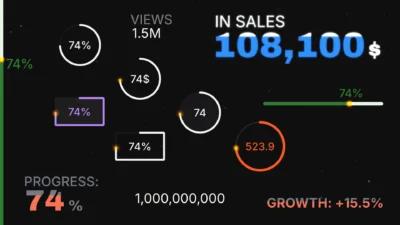
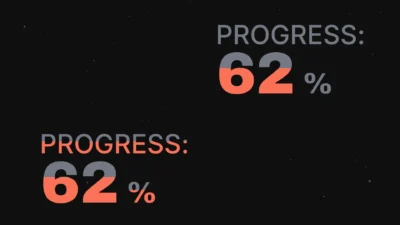
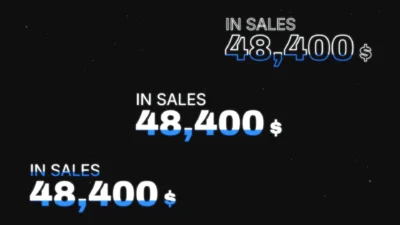
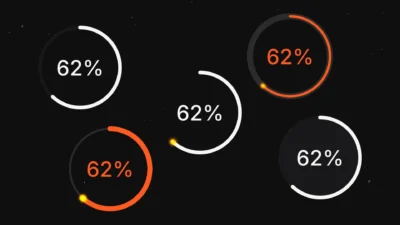


DaVinci Resolve Counter Animation Titles Pack | 9 Animated Number Counter Templates
Create engaging videos with 9 customizable DaVinci Resolve counter animation templates, including circular and rectangular counters, orbit effects, and color-fill number counters. Customize number values, formatting, colors, and animations directly in the Inspector. Ideal for statistics, percentages, business presentations, and social media videos.
$14.99
- Instant download
- One-click
.drfxinstallation - Free & Studio compatible
- Customizable Inspector controls
DaVinci Resolve Counter Animation Templates for Number Counters and Progress Bars
DaVinci Resolve Counter Animation Titles Pack is a collection of 9 customizable animated number counter title templates for creating percentage counters, progress indicators, statistics, financial figures, social media milestones, business metrics, and other numeric animations. The pack includes circular, rectangular, edge, line, classic, and color-fill counter designs, giving you a variety of styles for different video projects.
Create professional animated number counters in DaVinci Resolve directly from the Edit page without building the animations manually in Fusion. Simply add a counter title to your timeline, enter your initial and final values, customize the text and appearance, and preview the animation directly in your project.
Each template includes customizable counter values, leading and trailing text, decimal places, thousands separators, typography, and animation settings. Depending on the template, you can also customize progress bars, circular or rectangular backgrounds, gradients, glow effects, shadows, color presets, and entrance and exit animations.
From a simple count-up animation, a circular progress counter, a percentage indicator, a financial statistics graphic, to a bold color-fill number animation, this DaVinci Resolve number counter titles pack gives you multiple designs and extensive Inspector controls to create counters that match your video.
Included Templates
The pack includes 9 animated number counter title templates for DaVinci Resolve:
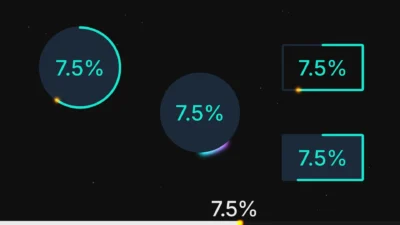
- Circle Counter: An animated number counter surrounded by a circular progress ring, with customizable base styles, progress direction, a glowing progress tip, and automatic or manual circle sizing.
- Classic Counter: A clean, text-only number counter animation for statistics, figures, milestones, and general numeric displays.
- Classic Counter Plus: A customizable number counter with independently adjustable leading and trailing text, including separate font, color, size, and position settings.
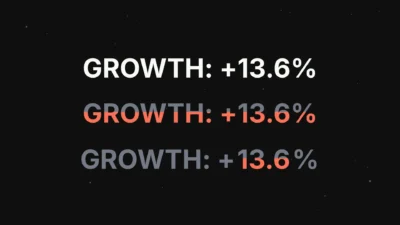
- Color Fill Counter: A number counter with an animated color-fill effect that moves through the text as the number changes.
- Color Fill Counter Plus: Combines the animated text-fill effect with independently customizable leading and trailing text.
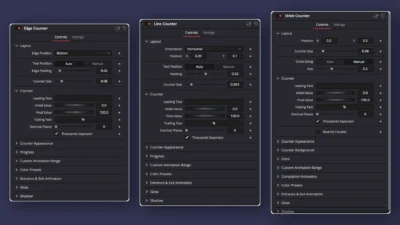
- Edge Counter: A counter with a progress bar attached to the top, bottom, left, or right edge of the frame. Position the text automatically near the selected edge or manually anywhere on the screen.
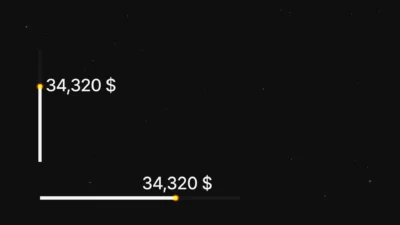
- Line Counter: A counter with a customizable horizontal or vertical progress line that can be positioned anywhere in the frame.
- Orbit Counter: A circular counter featuring a moving gradient orbit, with rotating-segment and dynamic-length animation styles, adjustable thickness, softness, inset, and color.
- Rectangle Counter: A counter surrounded by a customizable rectangular progress design, with adjustable width, height, and other available appearance settings.
Features
- 9 customizable animated number counter title templates.
- Count-up and reverse counter animations using adjustable initial and final values.
- Customizable leading and trailing text, including labels, symbols, units, and percentages.
- Adjustable decimal precision from zero to two decimal places.
- Optional thousands separators for improved readability of large numbers.
- Multiple counter styles, including circular, rectangular, edge, line, classic, and color-fill designs.
- Customizable progress direction, length, thickness, position, and appearance where available.
- Automatic and manual sizing options on supported circular and rectangular designs.
- Coordinated color presets on supported templates.
- Custom animation ranges for controlling when the counter starts and finishes.
- Optional completion pop animation on supported templates.
- Customizable entrance and exit animations, including fade, slide, and zoom.
- Optional glow and shadow effects with adjustable settings.
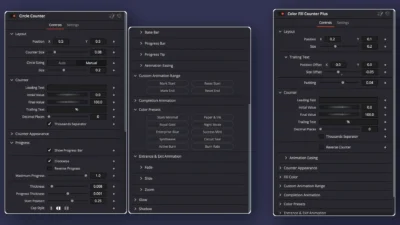
- Editable controls organized in the DaVinci Resolve Inspector.
- No third-party plugins required.
Compatibility
- Software: DaVinci Resolve 20 and newer, Free and Studio versions.
- Template Type: Title Templates.
- Operating Systems: Windows and macOS.
What You Will Receive
You will receive a ZIP file containing:
- Counter_Animation_Titles_Pack.drfx – An installable DaVinci Resolve template pack containing all 9 counter templates.
- Font Files – A folder containing font files.
- README.txt – Installation instructions and a quick start guide.
How to Install
- Download and extract the ZIP package.
- Open the Font Files folder and install all included .ttf font files before installing the templates.
- Double-click the
.drfxtemplate file to install in DaVinci Resolve. - Open the Edit page and go to Effects Library → Toolbox → Titles → DvBlend.
- If the templates do not appear immediately, restart DaVinci Resolve.
- Locate the counter templates and drag your preferred title onto the timeline.
- Select the title clip and open the Inspector to customize its settings.
For detailed instructions, see How to Install DaVinci Resolve Templates (.drfx Files).
How to Use
- Open the Edit page in DaVinci Resolve.
- Navigate to Effects Library → Toolbox → Titles → DvBlend.
- Drag one of the nine counter titles onto your timeline.
- Select the title clip and open the Inspector.
- Set the initial and final values, then customize the leading and trailing text as needed.
- Adjust decimal places and thousands separators for your desired number format.
- Customize the counter appearance, progress graphics, colors, and other available settings.
- Adjust the animation range, entrance and exit effects, glow, and shadow where available.
- Preview the result and fine-tune the controls to match your project.
What You Can Create
Use these animated number counter templates in a wide range of video projects, including:
- YouTube Videos: Subscriber milestones, view counts, likes, channel statistics, and audience growth.
- Business and Marketing Videos: Revenue figures, sales targets, customer statistics, conversion rates, and business growth.
- Financial Videos: Money counters, investment figures, profits, savings, percentages, and financial comparisons.
- Educational Videos: Animated statistics, quiz scores, percentages, data comparisons, and infographic sequences.
- Social Media Content: Follower counts, engagement rates, downloads, milestones, and promotional graphics.
- Fitness and Lifestyle Videos: Steps, calories, workout progress, distance, and personal goals.
- Presentations and Explainer Videos: Key figures, performance indicators, progress tracking, and animated data visualization.
- Product and Promotional Videos: Discounts, quantities, product statistics, completed targets, and sales milestones.
Customize Counter Values and Text
Every template includes controls for customizing the displayed number and its accompanying text. Set the initial and final values to create the desired counter animation.
- Initial Value: Set the starting number of the animation.
- Final Value: Set the target number where the animation finishes.
- Leading Text: Add text before the number, such as
PROGRESS:,GROWTH: +, or$. - Trailing Text: Add text after the number, such as
%,VIEWS,SUBSCRIBERS, orSAVED. - Decimal Places: Choose zero, one, or two decimal places depending on the required precision.
- Thousands Separator: Enable or disable comma separators for large numbers.
For example, create counters such as 0% → 100%, PROGRESS: 0% → PROGRESS: 100%, $0 → $50,000, or 0 → 100,000 SUBSCRIBERS. Customize the values, labels, and units to suit your project.
Counter Appearance and Typography
Customize the counter text to match your video’s design. Available appearance controls vary by template and may include:
- Font family and font style.
- Counter text size, position, and opacity.
- Text color and other appearance settings.
- Separate typography and color settings for leading and trailing text in the Plus templates.
- Relative size and position adjustments for leading and trailing text in the Plus templates.
- Animated color filling in the Color Fill Counter and Color Fill Counter Plus templates.
- Reverse counter behavior for reversing the number animation and color-fill direction in the supported color-fill templates.
Circular and Rectangular Progress Counters
The Circle Counter, Orbit Counter, and Rectangle Counter provide distinctive progress-based designs. Customize the progress graphics to suit your layout and visual style.
- Show or hide supported progress and background elements.
- Adjust circle sizing automatically or manually on supported circular templates.
- Adjust the rectangle’s width and height in the Rectangle Counter.
- Customize progress thickness, direction, start position, and other available settings.
- Limit the maximum progress to display a partial circular progress ring where supported.
- Choose between outline and solid base-circle styles in the Circle Counter.
- Customize the Orbit Counter’s rotating gradient segment or dynamic-length animation, including its speed, length, thickness, inset, softness, opacity, and color.
- Enable or disable the glowing progress tip on supported templates.
Edge and Line Progress Counters
The Edge Counter and Line Counter offer alternative progress layouts for videos that need a horizontal or vertical progress indicator.
- Edge Counter: Attach the progress bar to the top, bottom, left, or right edge of the frame.
- Line Counter: Choose a horizontal or vertical line and position it anywhere on the screen.
- Use automatic text positioning with adjustable padding on supported layouts.
- Manually position the counter text independently of the edge progress bar.
- Customize progress length, thickness, corner radius, direction, and other available settings.
- Adjust the base bar, progress bar, and progress tip individually where available.
Custom Animation Range and Completion Animation
Control when your number counter animation begins and finishes without relying exclusively on the beginning and end of the title clip.
- Mark Start: Set a custom starting point for the counter animation.
- Reset Start: Restore the default starting range.
- Mark End: Set a custom ending point so the counter finishes before the title clip ends.
- Reset End: Restore the default ending range.
- Completion Animation: Enable the completion pop effect, with adjustable animation duration and pop scale where available.
Note: The completion pop is designed to play after the counter finishes when a custom end point is set using Mark End, leaving additional frames for the finishing effect.
Color Presets
Apply coordinated color combinations with a single click on supported templates. These presets adjust the relevant counter and progress colors, helping you quickly create a consistent visual style without manually changing every color control.
Entrance and Exit Animations
Add motion to your counter titles with customizable entrance and exit animations on supported templates.
- Fade: Fade the counter in or out.
- Slide: Animate the counter from the left, right, top, or bottom, with adjustable slide distance.
- Zoom: Add zoom-based entrance or exit motion.
- Animation Duration: Adjust the duration of supported animation effects.
- Animation Easing: Customize the motion using the available easing options.
Glow and Shadow Effects
Enhance the appearance of your counter titles with optional glow and shadow effects on supported templates.
- Enable or disable glow and shadow effects where available.
- Adjust glow strength and size.
- Customize shadow offset, softness, strength, and color.
- Fine-tune the effects to create subtle, clean graphics or more prominent counter animations.
Why Choose This Counter Animation Titles Pack?
Create animated number counters without building every animation from scratch. This pack includes nine customizable DaVinci Resolve counter title templates, ranging from clean text-only counters to circular progress rings, rectangular progress designs, edge indicators, line counters, and animated color-fill text.
Set your starting and ending values, add labels or symbols, choose your number format, and customize the appearance directly in the Inspector. Use these templates to present statistics, percentages, financial figures, business data, and other numbers in YouTube videos, social media content, presentations, educational videos, and promotional projects.
Related products
-

Smooth Color Glow Wipe Transition Template for DaVinci Resolve | Radiant Linear Wipe
$2.49 -

Liquid Glass Title for DaVinci Resolve | Glass Text & Lower Third Templates
$4.99 -
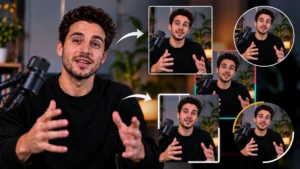
Picture-in-Picture (PiP) Frame Pack for DaVinci Resolve | Animated Borders & Full-to-PiP Templates
$11.99 -
Free Rectangle Highlight and Zoom Template for DaVinci Resolve | Smart Rectangle Focus Free
$0.00