
USD

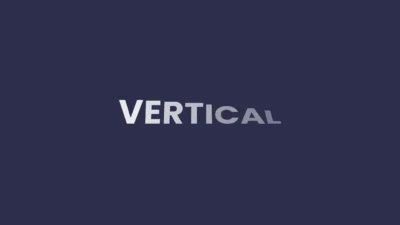
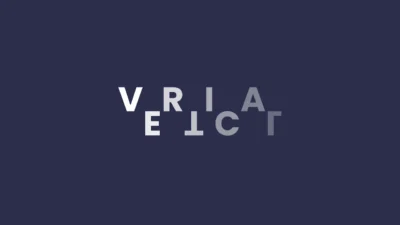
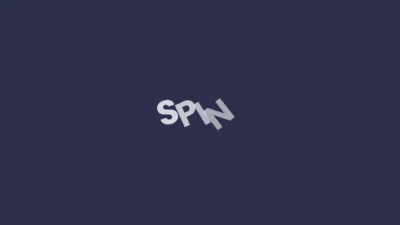


Animated Flip & Spin Text Titles for DaVinci Resolve (With Lower Thirds)
USD
Drag and drop animated flip and spin text titles for DaVinci Resolve. Includes 6 customizable Fusion-built presets with center and lower thirds. No plugins required.
Original price was: $9.99.$7.99Current price is: $7.99.
Flip & Spin Title Reveal Pack for DaVinci Resolve
Animated Flip & Spin Text Titles is a collection of six flexible and modern animated text titles designed for fast use directly on the Edit page in DaVinci Resolve. The pack includes three distinct reveal styles with both center and lower-third variants, built to deliver smooth per-character motion with minimal setup.
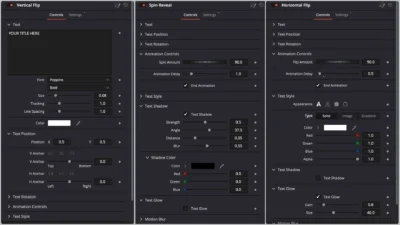
Each title is fully customizable through the Inspector, allowing control over text appearance, animation timing, flip and spin strength, shadow, glow, and motion blur. The animations are designed to feel responsive and polished, making them ideal for tutorials, interviews, explainer videos, and social media content.
Built entirely inside Fusion, these titles do not rely on third-party plugins. All customization is handled through a clean and organized Inspector interface, making it easy to adjust the look and behavior of the text while maintaining a consistent and professional result.
Features of this template
- Six animated text title presets
- Three animation styles: Vertical Flip, Horizontal Flip, and Spin Reveal
- Center and Lower Third variants included
- Smooth per-character reveal animation
- Adjustable flip and spin amount
- Built-in end animation toggle
- Animation delay control
- Full font customization
- Advanced fill options: solid, image, and gradient
- Stroke, outline, and gradient mapping controls
- Optional text shadow with full control
- Optional text glow with adjustable intensity
- Motion blur support
- Fully procedural and lightweight
- Built entirely in Fusion
- No external plugins required
Included title presets
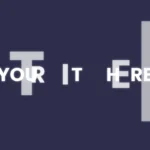
- Vertical Flip: A vertical flip text reveal animation, revealing characters one by one with smooth motion.
- Vertical Flip Lower Third: A vertical flip animation optimized for lower-third placement with responsive positioning.
- Horizontal Flip: A horizontal flip text reveal animation for clean side-to-side motion.
- Horizontal Flip Lower Third: A horizontal flip animation adapted for lower-third layouts with balanced positioning.
- Spin Reveal: A spin-based text reveal animation for dynamic rotational motion.
- Spin Reveal Lower Third: A spin reveal animation designed for lower-thirds with controlled rotation and clean readability.
Compatibility
- Software: DaVinci Resolve 18 or newer (Free and Studio)
- Operating Systems: Windows, macOS, and Linux
What is included
You will receive a ZIP file containing:
- AnimatedFlipSpinTitles.drfx
- Font Files (Poppins.zip)
- README.txt (installation and usage guide)
How to install
- Download and unzip the package
- Open the Font Files and install all .ttf font files before using the template.
- Note: If the Poppins font is already installed on your system, you may skip this step and proceed directly to installing the template.
- Double-click the AnimatedFlipSpinTitles.drfx file to install all titles.
- Click Install (or Overwrite if updating).
- Restart DaVinci Resolve.
On the Edit Page, navigate to: Effects Library > Toolbox > Titles > DvBlend
You can also use the search bar and type Flip or Spin.
How to use
- On the Edit Page, drag any title from the Effects Library onto the timeline.
- Select the title clip and open: Inspector > Video > Title
- Customize the text:
- Edit text content
- Choose font and alignment
- Adjust color and opacity
- Adjust animation controls:
- Modify flip or spin amount
- Set animation delay
- Enable or disable end animation
- Enhance the look:
- Enable text glow or shadow
- Adjust stroke and gradient styling
- Adjust motion blur as needed
- Preview and refine until the animation fits your edit.
Related products
-
Free Shadow Wipe Transition Template for DaVinci Resolve | Shadow Wipe Free
$0.00 -
Animated Grid Background Generator for DaVinci Resolve | Dynamic Grid
$3.99 -
Smooth Color Glow Wipe Transition Template for DaVinci Resolve | Radiant Linear Wipe
$1.99 -
Free Slide Text Animation Template for DaVinci Resolve | TextFlow 12 – Directional Slide Free
$0.00

Reviews
There are no reviews yet.