$ USD

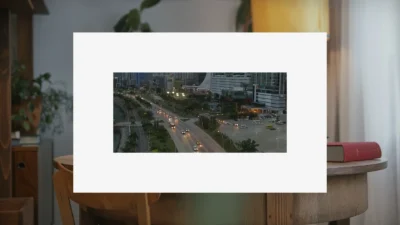


Frame Expand Transition for DaVinci Resolve | Framed Reveal Effect
Create clean framed reveal transitions in DaVinci Resolve with customizable frame thickness, color, glow, shadow, and edge blending controls. Drag and drop workflow.
$3.99
- Instant download
- One-click
.drfxinstallation - Free & Studio compatible
- Customizable Inspector controls
Create Clean Framed Reveal Transitions for YouTube Videos, Documentaries, and Professional Video Projects
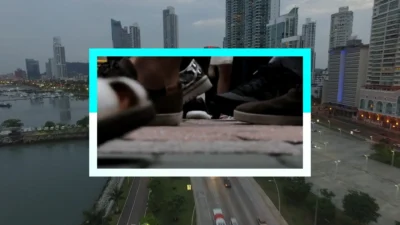
Frame Expand is a modern reveal transition for DaVinci Resolve that introduces the incoming clip inside a framed window before smoothly expanding it to fill the screen. The transition creates a clean and professional visual handoff between scenes while adding structure, motion, and visual focus to the edit.
Suitable for YouTube videos, documentaries, interviews, corporate productions, travel films, educational content, product showcases, and cinematic storytelling, Frame Expand provides a polished alternative to traditional cuts and standard zoom transitions.
The transition is equally effective for scene changes, chapter introductions, visual comparisons, highlight moments, and modern content creation workflows, helping footage feel more dynamic while maintaining a clean and professional appearance.
Features
- Framed reveal transition with expanding window animation
- Smooth and professional scene transitions
- Drag-and-drop workflow directly on the Edit page
- Built entirely inside Fusion
- Adjustable frame thickness
- Custom frame color support
- Optional frame glow effect
- Optional frame shadow effect
- Adjustable edge blending
- Optimized for smooth playback and performance
- No external plugins required
Ideal For
- YouTube videos
- Documentary projects
- Educational content
- Corporate videos
- Travel films
- Product showcases
- Interviews and talking-head content
- Modern video editing workflows
- Chapter and section transitions
- Cinematic storytelling
Compatibility
- Software: DaVinci Resolve 20 or newer (Free and Studio versions supported)
- Operating Systems: Windows, macOS, and Linux
What You Will Receive
You will receive a ZIP file containing:
- FrameExpand.drfx (installable template file)
- README.txt
How to Install
- Download and unzip the package.
- Double-click the FrameExpand.drfx file to install the template in DaVinci Resolve.
For detailed step-by-step instructions: How to Install DaVinci Resolve Templates (.drfx Files)
How to Use
- Open the Edit Page in DaVinci Resolve
- Go to the Effects Library → Toolbox → Video Transitions → DvBlend → Frame Expand
- Drag and drop Frame Expand between two clips
- Select the transition and open the Inspector
- Adjust frame thickness, color, edge blending, glow, and shadow settings
- Preview and fine-tune the transition to match your project
Related products
-
Free Rectangle Highlight and Zoom Template for DaVinci Resolve | Smart Rectangle Focus Free
$0.00 -
Corner Highlight and Zoom Effect for DaVinci Resolve | Smart Corner Focus
$6.99 -

Free Arrow Generators for DaVinci Resolve
$0.00 -

Text Reveal Inward & Outward Titles for DaVinci Resolve | 6 Animation Presets
$7.99