$ USD
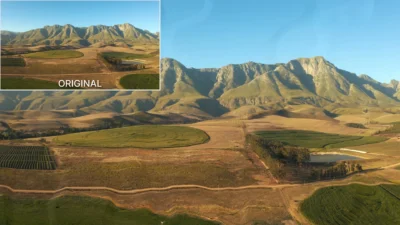
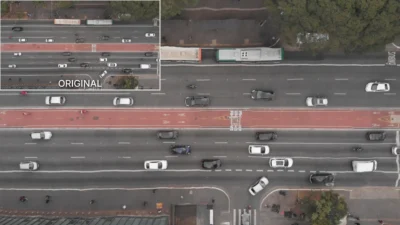
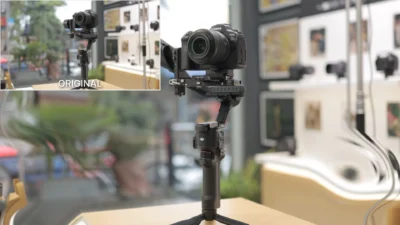


Atmospheric Turbulence Effect for DaVinci Resolve | Heat Haze & Distortion Effect
Atmospheric Turbulence Effect for DaVinci Resolve, create realistic heat haze, mirage distortion, atmospheric shimmer, and environmental turbulence with simple drag-and-drop controls. Fully customizable Fusion effect with adjustable distortion strength, turbulence, density, and motion. Compatible with DaVinci Resolve Free and Studio.
$2.99
- Instant download
- One-click
.drfxinstallation - Free & Studio compatible
- Customizable Inspector controls
Create Realistic Heat Haze, Mirage Distortion, and Atmospheric Turbulence Effects
Atmospheric Turbulence is a fully procedural distortion effect for DaVinci Resolve designed to simulate organic atmospheric movement, heat shimmer, mirage distortion, and subtle environmental turbulence. This drag-and-drop Fusion effect creates natural distortion patterns that can range from gentle summer heat haze to intense turbulent air movement.
Built entirely inside Fusion with a clean Inspector interface, Atmospheric Turbulence gives editors precise control over distortion strength, coverage, turbulence complexity, heat density, and motion speed directly from the Edit page. No Fusion knowledge is required.
Features
- Fully procedural atmospheric distortion effect
- Realistic heat haze and mirage simulation
- Drag-and-drop workflow directly on the Edit page
- Built entirely inside Fusion
- Clean and organized Inspector controls
- Adjustable distortion strength and coverage
- Customizable turbulence complexity and motion
- Suitable for subtle atmospheric shimmer or heavy distortion
- Optimized for smooth playback and performance
- No external plugins required
Inspector Controls
Atmospheric Turbulence is designed with simple and intuitive controls for quick customization directly from the Inspector.
- Distortion Strength to control overall distortion intensity
- Distortion Coverage to control how much of the image is affected
- Atmospheric Turbulence to adjust turbulence complexity and variation
- Distortion Viscosity to control the fluidity and organic movement of the distortion
- Heat Density to adjust the density and scale of turbulent patterns
- Atmospheric Motion to control movement speed and animation behavior
- Turbulent Mode for an alternative turbulence style
Ideal For
- Heat haze effects
- Road mirage distortion
- Desert environments
- Summer atmosphere simulation
- Engine exhaust turbulence
- Dream and surreal sequences
- Environmental distortion effects
- Cinematic visual storytelling
Compatibility
- Software: DaVinci Resolve 20 or newer (Free and Studio versions supported)
- Operating Systems: Windows, macOS, and Linux
What You Will Receive
You will receive a ZIP file containing:
- AtmosphericTurbulence.drfx (installable template file)
- README.txt
How to Install
- Download and unzip the package.
- Double-click the AtmosphericTurbulence.drfx file to install the template in DaVinci Resolve.
For detailed step-by-step instructions: How to Install DaVinci Resolve Templates (.drfx Files)
How to Use
- Open the Edit Page in DaVinci Resolve
- Go to the Effects Library → Toolbox → Effects → DvBlend → Atmospheric Turbulence
- Drag and drop Atmospheric Turbulence onto a clip or Adjustment Clip
- Select the effect and open the Inspector
- Adjust distortion, turbulence, density, and motion settings
- Preview and fine-tune the effect to match your scene
Related products
-
Free Rectangle Highlight and Zoom Template for DaVinci Resolve | Smart Rectangle Focus Free
$0.00 -
Ultimate Arrow Animation Generator Pack for DaVinci Resolve
$9.99 -
Free Heat Wave and Mirage Distortion Template for DaVinci Resolve | Heat Haze
$0.00 -
Free Customizable Cinematic Transition Template for DaVinci Resolve | Texture Wipe
$0.00