$ USD




Blink Brightness Video Effect with Masking for DaVinci Resolve | Blink Focus
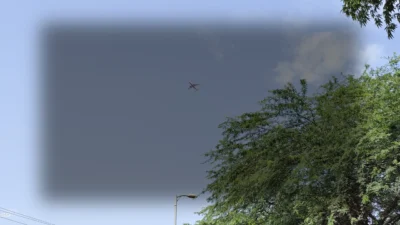
Smooth blinking brightness effect for DaVinci Resolve with optional masking. Control blink timing and brightness baseline. Works on clips and adjustment layers. Drag and drop effect.
$2.99
Smooth Blink Focus Effect With Optional Masking
Blink Focus is a drag-and-drop Fusion effect for DaVinci Resolve that creates a smooth blinking brightness animation on any clip or adjustment clip. The effect cycles brightness from normal to darker or brighter levels and can optionally be limited to a specific area using built-in shape masks, making it ideal for subtle emphasis and attention control.
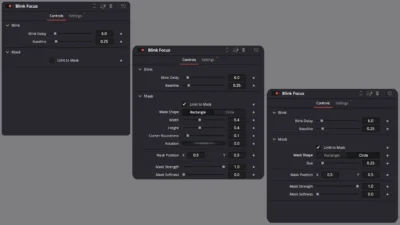
Designed to stay clean and predictable, Blink Focus gives you direct control over blink timing and brightness baseline without the need for keyframes. You can apply the effect to an entire clip for full-frame blinking or enable masking to restrict the effect to a rectangle or circle area. All controls are available directly in the Inspector, making the effect fast to set up and easy to fine-tune.
Built entirely inside Fusion, Blink Focus does not rely on any third-party plugins. It works seamlessly on the Edit page and can be applied to both clips and adjustment layers without affecting performance or workflow.
Features of this template
- Smooth blinking brightness effect
- Adjustable blink timing
- Baseline brightness control
- Supports darkening and brightening blinks
- Works on clips and adjustment layers
- Optional mask-based focus area
- Built-in Rectangle and Circle mask shapes
- Adjustable mask size, position, rotation, and softness
- Clean, minimalist visual output
- Works directly on the Edit page
- Built using Fusion
- No external plugins required
Included mask shapes
The following mask shapes are included in this effect:
- Rectangle
- Circle
Both shapes use the same masking and animation system to ensure consistent and predictable behavior.
Compatibility
Software: DaVinci Resolve 18 or newer (Free and Studio)
Operating Systems: Windows, macOS, and Linux
What is included
You will receive a ZIP file containing:
- BlinkFocus.drfx (installable effect file)
- README.txt (installation and usage guide)
How to install
- Download and unzip the package.
- Double-click BlinkFocus.drfx to install the effect.
- Click Install or Overwrite if updating.
- Restart DaVinci Resolve.
On the Edit Page, navigate to: Effects Library > Toolbox > Effects > DvBlend
You can also use the search bar and type Blink Focus.
How to use
- Drag Blink Focus onto a clip or adjustment clip.
- Select the clip and open: Inspector > Effects > Fusion > Blink Focus
- Adjust Blink controls:
- Blink Delay
- Baseline
- Enable Limit to Mask to restrict the effect to a specific area.
- Choose a Mask Shape:
- Rectangle or Circle
- Adjust mask controls:
- Size
- Position
- Rotation for Rectangle
- Corner Roundness for Rectangle
- Mask Strength
- Mask Softness
- Preview and fine-tune the effect until it fits your edit.
Related products
-

Text Reveal Inward & Outward Titles for DaVinci Resolve | 6 Animation Presets
$7.99 -
Floating Circle Outline and Highlight Effect for DaVinci Resolve | Open Circle Focus
$6.00 -

Liquid Glass Title for DaVinci Resolve | Glass Text & Lower Third Templates
$4.99 -
Rectangle Highlight and Zoom Effect for DaVinci Resolve | Smart Rectangle Focus
$5.88