$ USD




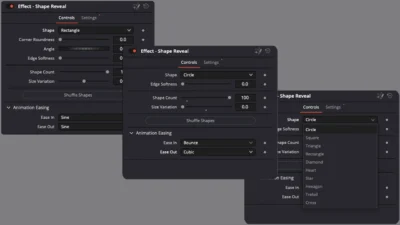


Shape Reveal Transition for DaVinci Resolve (10 Shapes)
Customizable shape reveal transition for DaVinci Resolve with 10 built-in shapes like circle, rectangle, triangle, and more. Drag and drop, control shape count, variation, soft edges, and smooth easing. No plugins required
$4.99
Customizable Circle, Rectangle, Triangle and More Mask-Based Reveal Transitions
Shape Reveal Transition for DaVinci Resolve is a flexible mask-based video transition designed for clean, modern edits. It allows you to reveal the next clip using multiple geometric shapes with full control over shape distribution, variation, softness, and animation easing, all directly on the Edit page.
This transition is built to stay simple and predictable. You can choose from 10 included shapes, adjust how many shapes appear on screen, randomize their placement, and fine-tune the animation using shared Ease In and Ease Out controls. The result is a consistent and professional reveal that works well for modern videos, explainers, reels, and motion-focused edits.
Built entirely inside Fusion, Shape Reveal Transition does not rely on any third-party plugins. All customization is handled through a clean Inspector interface, making it easy to adjust the look and motion without breaking workflow or performance.
Features of this template
- Shape-based reveal video transition
- 10 built-in shapes included
- Adjustable shape count
- Shape size variation control
- Shape angle control
- Optional corner roundness for rectangle shape
- Soft edge control for smooth mask transitions
- Randomized shape distribution with one-click shuffle
- Smooth animation with Ease In and Ease Out controls
- Consistent animation behavior across all shapes
- Works directly on the Edit page
- Built using Fusion
- No external plugins required
Included shapes
The following shapes are included in this transition:
- Circle
- Square
- Rectangle
- Triangle
- Diamond
- Heart
- Star
- Hexagon
- Trefoil
- Cross
Each shape uses the same animation system to ensure consistent, predictable motion across all variations.
Compatibility
- Software: DaVinci Resolve 18 or newer (Free and Studio)
- Operating Systems: Windows, macOS, and Linux
What is included
You will receive a ZIP file containing:
- ShapeReveal.drfx (installable template file)
- README.txt (installation and usage guide)
How to install
- Download and unzip the package.
- Double-click ShapeReveal.drfx to install the transition.
- Click Install or Overwrite if updating.
- Restart DaVinci Resolve.
On the Edit Page, navigate to: Effects Library > Toolbox > Video Transitions > DvBlend
You can also use the search bar and type Shape Reveal.
How to use
- Place two clips on the timeline.
- Drag the Shape Reveal Transition between the clips.
- Select the transition and open: Inspector > Transition > Shape Reveal
- Choose a shape from the Shape dropdown.
- Adjust shape controls:
- Shape count
- Size variation
- Angle
- Roundness where available
- Soft edge amount
- Click Shuffle Shapes to randomize shape placement.
- Adjust animation easing using Ease In and Ease Out controls.
- Preview and fine-tune until the transition fits your edit.
Related products
-

Text Reveal Inward & Outward Titles for DaVinci Resolve | 6 Animation Presets
$7.99 -
Corner Highlight and Zoom Effect for DaVinci Resolve | Smart Corner Focus
$6.99 -

YouTube Like and Subscribe Animation Titles for DaVinci Resolve | YouTube CTA Pack
$9.00 -

Picture-in-Picture (PiP) Frame Pack for DaVinci Resolve | Animated Borders & Full-to-PiP Templates
$12.99