$ USD
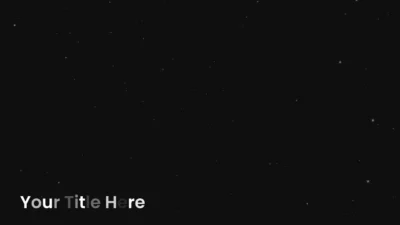




Free Random Reveal Lower Third Title Template for DaVinci Resolve
Free random reveal lower third title for DaVinci Resolve. Characters appear one by one in random order with a clean, modern opacity based animation. Built in Fusion and easy to customize.
$0.00
Create clean random text reveals in DaVinci Resolve
Random Reveal Lower Third is a free title template for DaVinci Resolve, designed for creators who want a clean, modern, and organic lower third animation without unnecessary complexity. It is lightweight, fast to use, and fits naturally into professional editing workflows.
Each character is revealed one by one in a random order using a smooth opacity based animation. This creates a minimal and polished result that works perfectly for name tags, captions, interviews, tutorials, and informational content.
Built entirely inside Fusion, this title preset prioritizes speed, clarity, and ease of use. It provides essential controls for typography, positioning, and timing, allowing you to customize the look quickly while keeping the workflow simple and distraction free.
Features of this title preset
- Characters reveal one by one in a random order using a clean opacity based animation
- Minimal and modern reveal style suited for lower thirds and captions
- Positioned at the lower third by default, with easy repositioning through Inspector controls
- Adjustable reveal delay to control animation speed without using keyframes
- Essential typography controls including font, size, tracking, line spacing, and color
- Lightweight Fusion based setup for smooth playback and a fast workflow
- Drag and drop ready with no keyframes required
- Beginner friendly while remaining reliable for professional projects
Compatibility
- Software: DaVinci Resolve (Free and Studio versions)
- Operating Systems: Windows, macOS, and Linux
What is included
You will receive a .zip file containing:
- Poppins.zip (Google Font used by the title preset)
- RandomRevealLowerThird.drfx (Installable lower third title template)
- README.txt (Installation and usage guide)
How to install
- Download and unzip the package.
- Open the Font Files folder.
- Unzip Poppins.zip and install all included .ttf font files.
- Double click RandomRevealLowerThird.drfx.
- Click Install (or Overwrite if updating).
- Restart DaVinci Resolve.
You can find the title preset on the Edit Page under: Effects > Toolbox > Titles > DvBlend
Tip: Use the search bar and type Random Reveal to locate it quickly.
How to use
- On the Edit Page, drag Random Reveal Lower Third onto your timeline.
- Select the title clip and open the Inspector.
- Edit your text inside Inspector > Video > Title.
- Customize:
- Font, size, tracking, and line spacing
- Text color
- Position using Center X and Y
- Reveal timing using Delay
Want cinematic title animations?
If you like this free preset, explore the Cinematic Scale & Slide Titles for DaVinci Resolve, a premium collection designed for bold, cinematic text reveals with full creative control.
Related products
-
Slide Text Animation Template for DaVinci Resolve | TextFlow 12 – Directional Slide
$3.88 -
Text Reveal Inward & Outward Titles for DaVinci Resolve | 6 Animation Presets
$7.99 -
Circle Highlight and Zoom Effect for DaVinci Resolve | Smart Circle Focus
$5.88 -

Liquid Glass Title for DaVinci Resolve | Glass Text & Lower Third Templates
$4.99