
$ USD
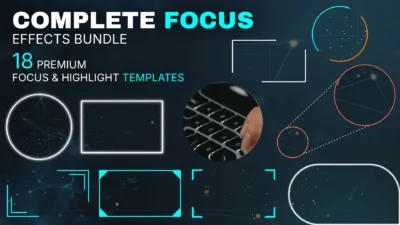




Complete Focus & Highlight Effects Bundle for DaVinci Resolve | 18 Templates
Create engaging videos with 18 customizable DaVinci Resolve focus and highlight templates. Explore circle, rectangle, polygon, and triangle effects, plus floating borders, Liquid Glass, and zoom magnifier callouts. Customize focus areas, borders, colors, and animations directly in the Inspector. Ideal for tutorials, product demos, and presentations.
$24.99
- Instant download
- One-click
.drfxinstallation - Free & Studio compatible
- Customizable Inspector controls
DaVinci Resolve Focus & Highlight Effects Templates for Circle, Rectangle, Polygon, and More
Complete Focus & Highlight Effects Bundle for DaVinci Resolve includes 18 customizable focus and highlight effect templates for emphasizing specific areas of your footage. The collection features circle, rectangle, corner, triangle, and custom polygon focus shapes, along with floating border effects, liquid glass designs, and a circular zoom magnifier callout. Each template offers a different way to frame, highlight, or magnify selected parts of your video.
Apply a template directly to a video clip or use it with an Adjustment Clip. Position and resize the focus area, then customize its appearance, colors, and animation settings through the Inspector controls on the Edit page. There is no need to build masks, borders, or animations manually.
Customization options vary by template and include adjustable focus shapes, border styles, thickness, colors, and animation controls. All 18 templates include essential focus and highlight effects, such as inside-area zoom and glow, outside-area blur, darkening and desaturation, and focus content tint. Selected templates also offer additional features, including floating border animations, liquid glass refraction, and adjustable magnifier callouts.
Use these templates to highlight objects, emphasize details, draw attention to text and interface elements, create animated focus frames, or magnify specific areas of your footage. The bundle brings all 18 effects together in one collection, covering a range of focus shapes and visual styles for DaVinci Resolve projects.
Included Templates
The bundle includes 18 customizable focus and highlight effect templates for DaVinci Resolve:
- 3-Point Polygon Focus: A triangular focus frame with three individually adjustable points, allowing you to create and position a custom polygon-shaped highlight area.
- 4-Point Polygon Focus: A four-point polygon focus frame that can be reshaped by adjusting each corner independently to highlight areas with custom proportions and angles.
- 5-Point Polygon Focus: A customizable five-point focus frame with independently adjustable points for creating irregular polygon-shaped highlight areas.
- 6-Point Polygon Focus: A six-point focus frame that lets you reposition individual points to create custom polygon shapes around specific areas of your footage.
- 8-Point Polygon Focus: An eight-point focus frame offering additional control over the shape of the highlighted area through independently adjustable points.
- Circle Focus: A classic circular focus effect with adjustable position and size, customizable border appearance, and Write On and Zoom border animations.
- Circle Focus Flex: A versatile circular focus frame featuring eight border styles: Single Static, Single Orbit, Single Dynamic Orbit, Dual Static, Dual Orbit, Dual Dynamic Orbit, Dual Switch, and Dual Breathing.
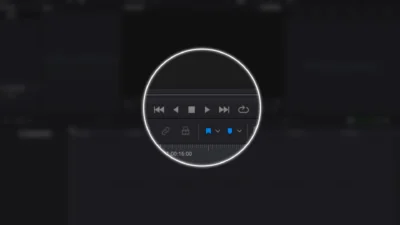
- Circle Focus Glass: A circular focus effect with an optional Liquid Glass appearance, adjustable refraction and spread, and a separately customizable focus outline with controls for thickness, opacity, and color.
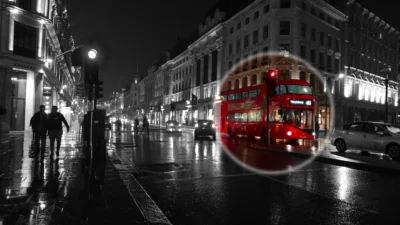
- Circular Zoom Callout: A magnifier-style callout that displays an enlarged circular view of a selected area alongside the original footage. Includes two connector lines with adjustable angle, distance, line style, thickness, dot spacing, opacity, and color.
- Corner Focus: A rectangular focus frame anchored to any corner of the screen, with adjustable width, height, corner radius, and horizontal and vertical offsets. Includes Write On, Zoom, Horizontal Reveal, and Vertical Reveal border animations.
- Floating Border Circle Focus: A circular focus effect featuring a floating, partially animated circumference border. Adjust its speed, coverage amount, jitter, and maximum border coverage.
- Floating Border Rectangle Focus: A rectangular focus frame with a floating border design. Customize its width, height, and corner radius to fit the highlighted area.
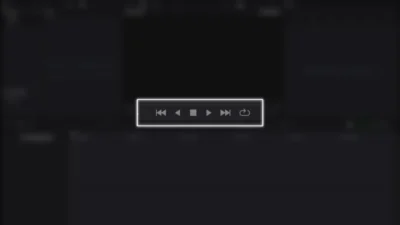
- Rectangle Focus: A customizable rectangular focus frame with adjustable width, height, corner radius, and rotation angle, along with multiple border appearance and animation options.
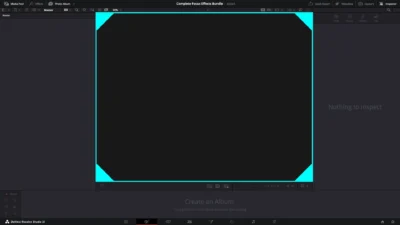
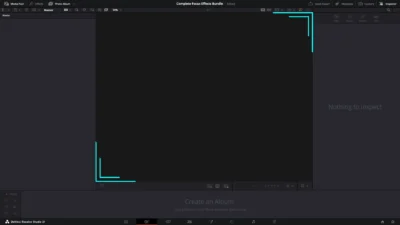
- Rectangle Focus Borders: A rectangular focus frame with five distinct border designs: Solid Border, Corner Brackets, Angled Brackets, Corner Triangles, and Dual Corner Lines. Also includes four animations: Converge and Expand, Converge and Shrink, Grow and Shrink, and Grow and Expand.
- Rectangle Focus Expand: A rectangular focus effect with a solid border and adjustable focus area, providing a straightforward frame for highlighting specific parts of your footage.
- Rectangle Focus Flex: A flexible rectangular focus frame featuring eight border styles: Single Static, Single Orbit, Single Dynamic Orbit, Dual Static, Dual Orbit, Dual Dynamic Orbit, Dual Switch, and Dual Breathing.
- Rectangle Focus Glass: A rectangular focus effect with an optional Liquid Glass appearance, adjustable refraction and spread, and a customizable focus outline with thickness, opacity, and color controls.
- Triangle Focus: A triangular focus frame with adjustable position, size, and rotation angle, along with customizable border settings and two border animation styles.
Features
- 18 customizable focus and highlight effect templates for DaVinci Resolve.
- Multiple focus shapes, including circles, rectangles, corners, triangles, and custom polygons with individually adjustable points.
- Customizable focus area position, size, dimensions, rotation, and shape, depending on the template.
- Adjustable border styles, thickness, colors, and appearance.
- Multiple border animation styles, including Write On, Zoom, Horizontal Reveal, Vertical Reveal, Converge, Grow, and Shrink animations on supported templates.
- Eight border styles on Circle Focus Flex and Rectangle Focus Flex, including static, orbit, dynamic orbit, switch, and breathing designs.
- Floating border effects with adjustable speed, coverage, jitter, and other appearance controls.
- Optional Liquid Glass effects with adjustable refraction and spread on Glass templates.
- Optional focus outline controls, including thickness, opacity, and color on Glass templates.
- Inside-area zoom and glow effects for emphasizing selected parts of your footage.
- Outside-area blur, darkening, and desaturation controls to reduce distractions around the focus area.
- Focus content tint controls for customizing the appearance of the highlighted area.
- Circular zoom magnifier callout with adjustable magnification area, connector angle, distance, line styles, thickness, dot spacing, opacity, and color.
- Customizable focus and border colors, with additional appearance controls depending on the template.
- Editable controls organized in the DaVinci Resolve Inspector.
- Apply templates directly to video clips or use them with Adjustment Clips.
- No third-party plugins required.
Compatibility
- Software: DaVinci Resolve 20 or later, Free and Studio versions.
- Template Type: Effect Templates.
- Operating Systems: Windows and macOS.
What You Will Receive
The download includes a ZIP file containing:
- Complete_Focus_Effects_Pack.drfx: An installable DaVinci Resolve template pack containing all 18 focus and highlight effect templates.
- README.txt: Installation instructions and a quick start guide.
How to Install
- Download and extract the ZIP package.
- Double-click the
.drfxtemplate file to install the templates in DaVinci Resolve. - Open the Edit page and navigate to Effects Library → Toolbox → Effects → DvBlend.
- If the templates do not appear immediately, restart DaVinci Resolve.
- Locate the focus effect templates and drag your preferred template onto a video clip or Adjustment Clip on the timeline.
- Select the applied effect and open the Inspector to access its customization controls.
For detailed instructions, see How to Install DaVinci Resolve Templates (.drfx Files).
How to Use
- Open the Edit page in DaVinci Resolve.
- Navigate to Effects Library → Toolbox → Effects → DvBlend.
- Drag your preferred focus or highlight effect onto a video clip or Adjustment Clip on the timeline.
- Select the applied effect and open the Inspector.
- Adjust the focus area position, size, and shape using the available controls.
- Customize the border appearance, thickness, colors, and animation settings where available.
- Adjust inside-area zoom and glow, outside-area blur, darkening, desaturation, and focus content tint to achieve the desired focus effect.
- Explore additional template-specific controls such as floating borders, Liquid Glass refraction, polygon points, and magnifier callout settings.
- Adjust the effect duration on the timeline and preview the result to fine-tune its appearance and animation.
What You Can Create
Use these focus and highlight effects in different types of video projects, including:
- YouTube Videos and Tutorials: Highlight software interface elements, menus, buttons, settings, important objects, and details viewers need to notice.
- Product Demonstrations: Draw attention to product features, specific components, design details, and important areas during demonstrations.
- Educational and Explainer Videos: Emphasize key information, diagrams, illustrations, text, and visual details while explaining a topic.
- Screen Recordings and Software Tutorials: Highlight cursor areas, interface controls, application panels, tools, and on-screen actions.
- Presentations and Business Videos: Focus attention on charts, graphs, statistics, text, and important visual elements.
- Documentary and Informational Videos: Highlight people, objects, locations, and specific details within photographs and video footage.
- Social Media Videos: Create animated focus frames and magnified callouts to emphasize important details in short-form content.
- Promotional and Marketing Videos: Draw attention to product details, promotional text, key visuals, and featured elements.
Customization and Inspector Controls
Focus Area Position and Shape
Customize the position, size, and shape of the highlighted area to target specific parts of your footage. Available controls depend on the selected template and may include:
- Position: Move the focus area horizontally and vertically to place it over the desired subject or detail.
- Size: Adjust the overall size of the focus area to highlight smaller or larger portions of your footage.
- Width and Height: Independently adjust the dimensions of rectangular focus areas.
- Rotation: Change the angle of supported focus shapes to match the orientation of the highlighted area.
- Corner Radius: Adjust the roundness of rectangular focus frames.
- Polygon Points: Reposition individual points independently in the polygon templates to create custom focus shapes.
- Corner Position and Offsets: Select the screen corner for Corner Focus and adjust its horizontal and vertical offsets.
Focus and Highlight Appearance
Control how the selected area and the surrounding footage appear. Customize the focus treatment to make important details stand out while reducing distractions elsewhere in the frame.
- Inside Zoom: Magnify the footage within the focus area.
- Inside Glow: Add a glow effect to the highlighted area.
- Outside Blur: Apply blur to the area surrounding the focus frame.
- Outside Darkening: Darken the surrounding footage to draw more attention to the selected area.
- Outside Desaturation: Reduce color saturation outside the focus area.
- Focus Content Tint: Customize the tint applied to the footage within the focus area.
Border Appearance and Customization
Customize the borders surrounding your focus areas with adjustable appearance settings and multiple design options on supported templates.
- Border Visibility: Enable or disable the border.
- Border Thickness: Adjust the thickness of the focus frame or individual border elements.
- Border Color: Customize the border color to match your video design.
- Border Opacity: Control the transparency of border elements.
- Corner Radius: Fine-tune rounded corners on supported rectangular borders.
- Border Designs: Choose from different appearances, including solid borders, corner brackets, angled brackets, corner triangles, and dual corner lines in Rectangle Focus Borders.
Flexible Border Styles
Circle Focus Flex and Rectangle Focus Flex include eight selectable border styles, offering different static and animated appearances.
- Single Static: A single stationary border surrounding the focus area with length and position offset controls.
- Single Orbit: A single border with an orbiting animation.
- Single Dynamic Orbit: An orbiting border with dynamically changing movement.
- Dual Static: Two stationary border elements with length and position offset controls.
- Dual Orbit: Two borders with orbiting animation.
- Dual Dynamic Orbit: Two borders with dynamic orbiting movement.
- Dual Switch: Two border elements with a switching animation.
- Dual Breathing: Two borders with a breathing-style animation.
Border Animations
Animate focus borders to introduce, reveal, or change the appearance of the highlighted area. Available animation styles vary by template and include:
- Write On: Reveal the border progressively as if it is being drawn.
- Zoom: Animate the border using a zoom-based effect.
- Horizontal Reveal: Reveal the border horizontally.
- Vertical Reveal: Reveal the border vertically.
- Converge and Expand: Animate border as they converge and expand.
- Converge and Shrink: Animate border as they converge and shrink.
- Grow and Shrink: Animate the border through growing and shrinking movements.
- Grow and Expand: Animate the border through growing and expanding movements.
Floating Border Controls
The Floating Border Circle Focus and Floating Border Rectangle Focus templates provide additional controls for customizing their floating border designs.
- Speed: Adjust the movement speed of the floating border.
- Amount: Control the amount of floating border coverage.
- Jitter: Adjust the irregularity of the floating border movement.
- Maximum Coverage: Set the maximum amount of border coverage.
- Rectangle Dimensions: Adjust the width, height, and corner radius of the floating rectangular border.
Liquid Glass Effects
Circle Focus Glass and Rectangle Focus Glass include optional Liquid Glass effects with additional controls for customizing their appearance.
- Liquid Glass: Enable or disable the Liquid Glass effect.
- Refraction: Adjust the refraction strength of the glass effect.
- Spread: Control the spread of the refraction effect.
- Focus Outline: Independently enable or disable the outline surrounding the focus area.
- Outline Thickness: Adjust the thickness of the focus outline.
- Outline Opacity: Control the transparency of the outline.
- Outline Color: Customize the outline color.
Circular Zoom Magnifier Callout
The Circular Zoom Callout template includes dedicated controls for positioning and customizing the magnified view and its connecting lines.
- Source Circle: Adjust the position and size of the circular area selected for magnification.
- Magnified Circle: Customize the position and size of the enlarged circular view.
- Callout Angle: Adjust the angle of the callout connecting the source and magnified areas.
- Callout Distance: Control the distance between the two circular areas.
- Line Style: Choose between solid and dotted connector line styles.
- Line Thickness: Adjust the thickness of the two connector lines.
- Dot Spacing: Customize the spacing of dots in dotted line styles.
- Opacity and Color: Adjust the opacity and color of the callout elements.
Why Choose This Focus Effects Bundle?
Instead of building focus frames, highlight effects, and magnifier callouts individually in Fusion, this bundle gives you 18 ready-to-use DaVinci Resolve templates covering a wide range of designs. From standard circle and rectangle focus frames to custom polygon shapes, flexible border styles, floating borders, Liquid Glass effects, and circular zoom magnification, the collection brings different focus and highlight techniques together in one pack.
Related products
-
Smooth Color Glow Wipe Transition Template for DaVinci Resolve | Radiant Linear Wipe
$2.49 -
Liquid Glass Title for DaVinci Resolve | Glass Text & Lower Third Templates
$4.99 -
Rectangle Highlight and Zoom Effect for DaVinci Resolve | Smart Rectangle Focus
$5.99 -
Animated Grid Background Generator for DaVinci Resolve | Dynamic Grid
$3.99